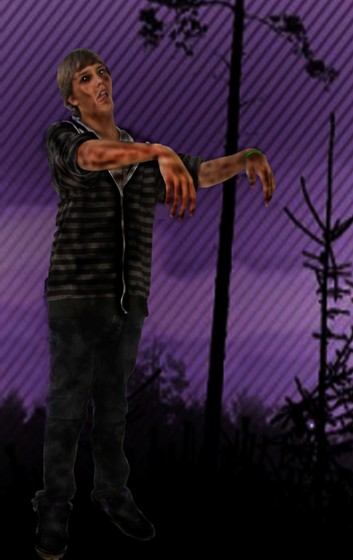
This is my Missouri zombie. This project was to test our photoshop skills, and use all that we have learned so far. We were to perfect our zombie and create a halloween atmosphere with a random person to work with.
In this project, I used liquify, the burn tool, dodge tool, blur tool, clone tool, free transform, magic wand tool, and pattern overlay. I started out with cutting the person out of the "green screen" first. I used the magic wand tool, and changed the tolerance a couple of times to cut him out nicely from the green screen. Then I chose this purple tree background, and I enlarged it using the free transform tool, so the boy would not look like he's bigger than the trees. After, I darkened the background to make it a little shadowy-looking by using the burn tool. Then, I being decorating his body to make him look like a zombie. I used the burn tool to darken/discolor his skin. I also used the burn tool to darken his clothes. Then I used the dodge tool to lighten his pupils, to get that ghostly feel, and I used the burn tool to darken the areas around his eyes, which made him look more dead-ish. I then chose a pattern using the pattern overlay, I chose this rugged smeared pattern, and applied it to his clothes only. Then I used the blur tool to blur his clothes. Now, I decided to do something effective to his face by using liquify. I narrowed down his cheeks to make him look a little skeleton-ish/skinny-looking. And I frowned his lips a little. The most tool I have used was the burn tool and blur tool, but the most difficult and important was the magic wand tool in using to cutting him out, because i could not leave any white spots. It was overall a fun assignment/project, and I had a great time coming up with random ideas to make him look like a zombie.
Comments: 0
There are no comments yet, be the first to write a comment!
 Aisia Lim